
There are three common ways to hand a host your code: upload a zip, point it at a git URL, or push a container image. We deployed the same two open-source apps each way, on a fresh host every time, and timed each step until the first 200 response. We ran 48 deploys in the main test, and the choice of path changed the total by much less than we expected.
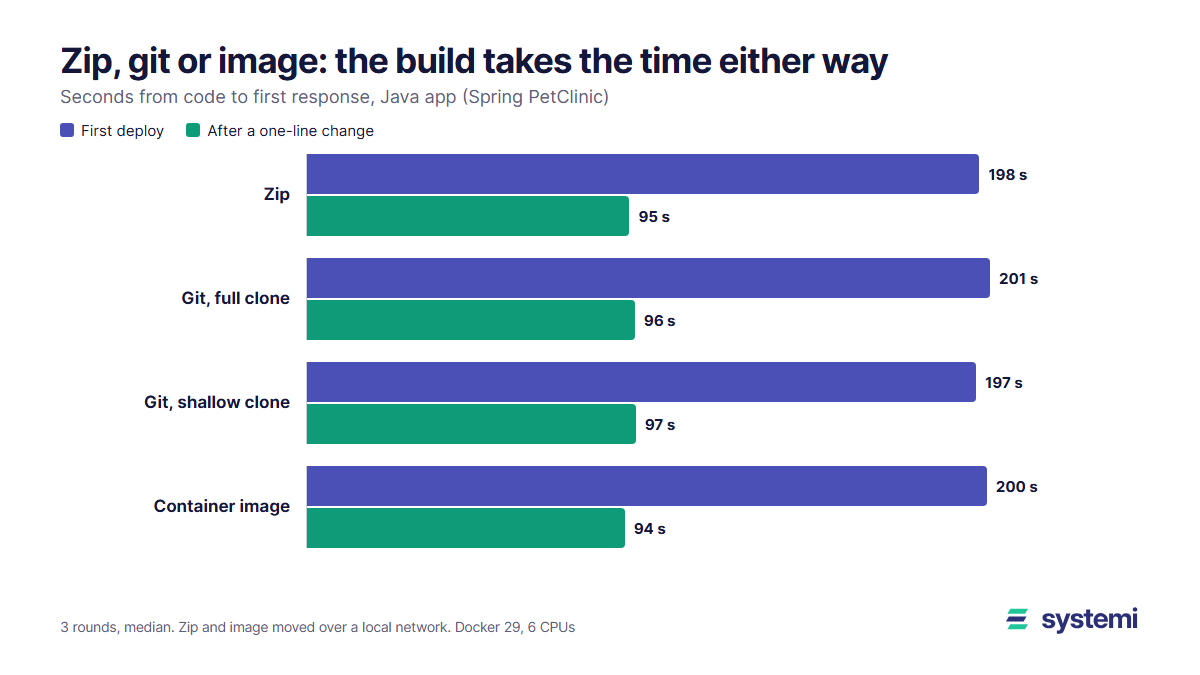
Short version: on the Java app the build took 191 s of a 198 s first deploy, about 97%, and every path needed that build somewhere. Moving the code took under 5 s here. What does differ is where the build runs and how many bytes travel: a zip of the Java app was 529 KB, its image 175 MB. On a repo with a long history, a shallow clone also matters: Django took about 95 s to clone in full and 6 s shallow.
What we deployed
| App | Repo | Commit tested | Dockerfile |
|---|---|---|---|
| Python | [heroku/python-getting-started](https://github.com/heroku/python-getting-started) | 561bc55, 10 Oct 2026 | Python 3.15 slim, pip install, collectstatic, gunicorn |
| Java | [spring-projects/spring-petclinic](https://github.com/spring-projects/spring-petclinic) | 500158f, 29 Sep 2026 | Maven build stage, then a Temurin 21 JRE with the jar |
Each path ran three rounds, and each round started from a new Docker host with an empty cache, so a first deploy also downloads the base images and every dependency. The second deploy in each round adds one comment line to a source file and goes through the same path again. Tables show medians.
| Path | What happens | Where it builds |
|---|---|---|
| Zip | `zip -r`, copy to the host, unzip, `docker build` | On the host |
| Git, full clone | `git clone --branch main`, `docker build` | On the host |
| Git, shallow clone | `git clone --depth 1 --single-branch --branch main`, `docker build` | On the host |
| Container image | `docker build` on a second machine, `docker push` to a registry, `docker pull` on the host | On the second machine |
The hosts were Docker 29 containers on one Windows PC running Docker Desktop on WSL2, with 6 CPUs and 11.7 GB. Git clones came from GitHub over our real connection. The zip copy and the image push and pull only crossed a local Docker network, because we had no second site to send them from. So the transfer times for those two are a best case, and we work out real link times from their sizes further down.
First deploy
| App and path | Move the code | Build | Start to first 200 | Total |
|---|---|---|---|---|
| Java: zip | 0.17 s | 191 s | 6.4 s | 198 s |
| Java: git, full clone | 4.4 s | 191 s | 6.2 s | 201 s |
| Java: git, shallow clone | 1.2 s | 190 s | 6.2 s | 197 s |
| Java: container image | 3.4 s | 190 s | 6.6 s | 200 s |
| Python: zip | 0.08 s | 27 s | 0.58 s | 28 s |
| Python: git, full clone | 1.2 s | 26 s | 0.56 s | 28 s |
| Python: git, shallow clone | 1.1 s | 30 s | 0.58 s | 32 s |
| Python: container image | 2.6 s | 26 s | 0.56 s | 30 s |
"Move the code" adds up the steps before the build: pack, copy and unzip for a zip, the clone for git, and push plus pull for an image. The pull includes unpacking layers, which is probably why it takes longer than the push here. Start to first 200 runs from docker run until the app answers, and it depends on the runtime, not on the path. We looked at that separately in Cold starts measured.
Across the four paths the Java totals only ran from 197 to 201 s and the Python totals from 28 to 32 s. The rounds of a single path varied by several seconds, so we wouldn't rank the paths on those gaps.
After a one-line change
| App and path | Move the code | Build | Start to first 200 | Total |
|---|---|---|---|---|
| Java: zip | 0.19 s | 88 s | 6.6 s | 95 s |
| Java: git, full clone | 4.2 s | 85 s | 6.9 s | 96 s |
| Java: git, shallow clone | 1.4 s | 89 s | 6.4 s | 97 s |
| Java: container image | 0.30 s | 86 s | 7.0 s | 94 s |
| Python: zip | 0.10 s | 1.5 s | 0.46 s | 2.0 s |
| Python: git, full clone | 1.2 s | 1.5 s | 0.42 s | 3.0 s |
| Python: git, shallow clone | 1.1 s | 1.5 s | 0.44 s | 3.0 s |
| Python: container image | 0.44 s | 1.7 s | 0.47 s | 2.5 s |
The Python app drops to about 3 s because its install layer stays cached and only the last steps rerun. The Java app still takes about 96 s: this Dockerfile copies everything before mvn package, so any change makes Maven download its dependencies and build again, on every path. That's a Dockerfile matter, not a deploy path matter. We measured the fix in Rebuild time when only your code changes.
One caveat on these rebuilds: a host that keeps its build cache gets them. A host that starts clean for each deploy pays the first-deploy build every time.
Bytes on the wire
This is where the paths really do differ. The sizes below are measured. The times are simple arithmetic at 100 Mbit/s (12.5 MB/s), not measurements, with no allowance for protocol overhead.
| What travels | Python | At 100 Mbit/s | Java | At 100 Mbit/s |
|---|---|---|---|---|
| Zip of the source | 26 KB | under 0.1 s | 529 KB | under 0.1 s |
| .git after a shallow clone | 100 KB | under 0.1 s | 580 KB | under 0.1 s |
| .git after a full clone | 355 KB | under 0.1 s | 11.7 MB | 0.94 s |
| Image, first push (compressed) | 57.8 MB | 4.6 s | 175 MB | 14 s |
| Image, new layers after a change | 400 KB | under 0.1 s | 59.5 MB | 4.8 s |
The last Java figure took an extra run. In the main test the Java image came out unchanged after the edit: a comment doesn't alter the compiled code, and the registry received 0 new bytes. That would flatter the image path, so we also deployed a change that reaches the jar, one extra line in a properties file. That pushed 59.5 MB of the 175 MB image, because the Spring Boot jar is a single layer, dependencies included. It was one run, but the size is the point there. Spring Boot's own docs call one layer not optimal and show how to split the dependencies out.
An image also travels twice: once from the build machine to the registry, and once from the registry to the host. A zip of source goes one way, but it's small only if it's clean. Ours came from git archive. A zip of a working folder with dependencies is another matter, as we measured in What a missing .dockerignore costs.
Full or shallow clone
On our two test apps the gap is small, about 3.2 s on Java. Their histories are short. So we also cloned django/django, which has 35,081 commits on main, three times each way:
| Clone of django/django | .git size | Time, whole seconds |
|---|---|---|
| Full | 310 MB | 95 s (95, 88, 101) |
| `--depth 1 --single-branch` | 13.5 MB | 6 s (6, 6, 6) |
A deploy only needs the files of one commit, so the history is overhead unless the build asks for it. Git's clone documentation notes that --depth already implies --single-branch; we pass both to make the intent plain. Check your build first: anything that runs git describe or counts commits for a version number sees only one commit of history.
Where the build runs
The totals hide what may be the bigger difference. With a zip or git, the host does the build: the Java app used it for about 191 s, downloading dependencies and compiling. With an image, the host only pulled and started, about 9.5 s here on a local network. The build still took 190 s, only on another machine.
| Zip or git URL | Container image | |
|---|---|---|
| You need | Source and a Dockerfile, or a platform that detects the runtime | A build machine or CI, and a registry |
| Build runs on | The host or its builder | Your machine or CI |
| What ran is pinned to | A commit, or a zip you keep; a rebuild can pick up newer dependencies unless they're locked | An image digest, the same bytes on every host |
| Same version on many hosts | Each one builds, unless a shared builder is used | Each one pulls |
Our reading, as opinion rather than measurement: for one app on one host, pick whichever is easiest, because the clock won't decide it. Use a shallow clone if you deploy from git, and keep zips clean. An image starts to earn its extra machinery when several hosts run the same version, when you want to roll back to the exact bytes you ran, or when the host is too small to run your build.
What this test doesn't show
It's one machine, where the deploy hosts and the build machine shared 6 CPUs, so a larger builder would shorten the builds and a remote host would lengthen the zip and image transfers. One Java deploy failed on a Docker Hub timeout, so we discarded that pair and repeated it; the failure stays in our raw log and out of the medians. We didn't test private repositories, automatic deploys on push, a registry-backed build cache or the time to switch traffic, all of which change the picture. The apps are small samples of their runtimes: a Python app with heavier dependencies would spend longer in its first build.
Sources (read 3 Nov 2026): git clone documentation and Spring Boot's efficient container images page. All timings and sizes are our own, from the setup above.
On systemi you send a zip of up to 50 MB or an https git URL and a branch. We fetch only the latest commit, then build and start your app and switch traffic over when it answers.
See how deploys work