
Running code you didn't write is hard to do cheaply. A coding assistant's sandbox, a notebook or a customer's script needs its own machine-grade isolation, and it sits idle most of the time, waiting for a person or a model. On 22 June 2026 AWS launched Lambda MicroVMs for this case: a Firecracker VM per user or job, started from a snapshot, that can suspend with its memory and disk intact.
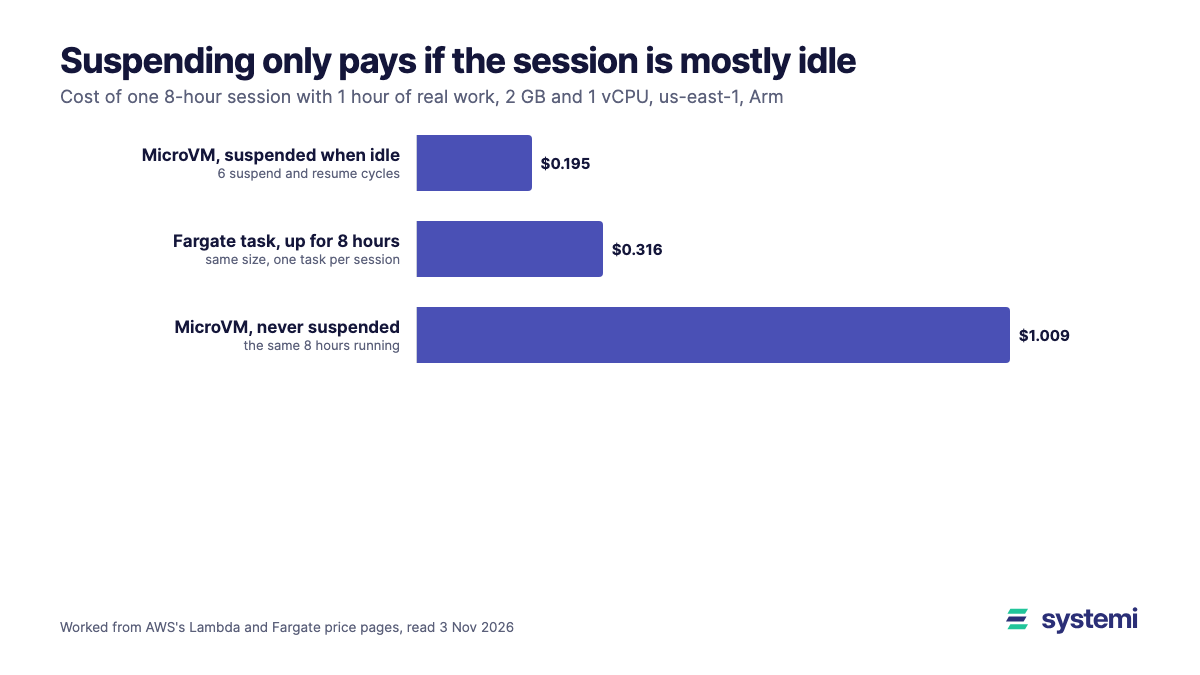
We read the docs and worked the numbers from the price page. Short version: a running MicroVM costs $0.1261 an hour at the default size, about 3.2 times a Fargate task of the same size, so it wins only through suspending. A session that is active for 1 hour out of 8 costs $0.195 against $0.316 for a task held open. The line crosses at about 2.0 active hours in 8. And the 8-hour limit is on the whole life of the MicroVM, suspended time included, which is tighter than most summaries suggest.
What it is
| Lambda MicroVMs, per AWS's docs | |
|---|---|
| Isolation | VM-level, on Firecracker; a dedicated HTTPS endpoint per MicroVM, no load balancing between them |
| Image | Zip with a Dockerfile and your code in S3; Lambda runs it on an Amazon Linux 2023 base, starts the app and snapshots memory and disk |
| Start | From the snapshot, skipping your app's initialisation; AWS gives no figure in the docs we read |
| Sizes | Baseline 0.5 GB and 0.25 vCPU up to 8 GB and 4 vCPU; each can burst to 4x; disk 8 to 32 GB |
| Lifespan | `--maximum-duration-in-seconds`: 1 to 28,800 s (8 hours), "including both running and suspended time" |
| Suspend | Automatic after `maxIdleDurationSeconds` with no traffic, or by API call; `suspendedDurationSeconds` sets when a suspended one is terminated |
| Resume | Automatic on traffic if enabled, with the request held meanwhile; 502 if the resume fails |
| Protocols | HTTP/2, WebSockets, gRPC, SSE; every request needs an auth token, there is no unauthenticated access |
| Regions at launch | N. Virginia, Ohio, Oregon, Tokyo, Ireland; the price examples are for Arm (Graviton) |
The lifespan line is the one to read twice. AWS's launch post says sessions can suspend and resume "for up to 8 hours", and that is the whole session: a MicroVM started at 09:00 is gone by 17:00 however long it slept. It is built for a working session, not for a tenant's environment that stays around for a week. For that, you would save your state elsewhere and start a new MicroVM.
What suspending costs
The price page lists these for us-east-1:
| Item | Price | At the default 2 GB and 1 vCPU |
|---|---|---|
| vCPU, running | $0.0000276944 per vCPU-second | $0.0997 an hour |
| Memory, running | $0.0000036667 per GB-second | $0.0264 an hour |
| Snapshot write, on each suspend | $0.0038 per GB | $0.0076 per suspend |
| Snapshot read, on each resume or launch | $0.00155 per GB | $0.0031 per resume |
| Snapshot storage | $0.08 per GB-month | $0.00022 per suspended hour |
| Above baseline | Same vCPU and memory rates, while active | Up to 4x at peak |
One suspend and resume of 2 GB costs $0.0107, the same as about 5.1 minutes of running. So a pause of more than about 5 minutes is worth suspending for, as far as the bill goes. The real limit is what the person feels on resume, which depends on the size of the state and your /resume hook. Setting maxIdleDurationSeconds much below your users' natural pauses would save cents and cost seconds on every return.
An idle-heavy session against an always-on container
Take a session of 8 hours with 1 hour of real activity at baseline, 7 hours idle, and 6 suspend and resume cycles, with 2 GB of state. We ignored bursts above baseline to keep it readable; AWS's own example, with 25% of its active time at peak, is below.
| Line | Working | Cost |
|---|---|---|
| Launch from snapshot | 2 GB x $0.00155 | $0.0031 |
| Running | 1 h x $0.1261 | $0.1261 |
| Suspend and resume | 6 x 2 GB x ($0.0038 + $0.00155) | $0.0642 |
| Suspended state | 2 GB x 7 h / 720 h x $0.08 | $0.0016 |
| MicroVM, suspended when idle | $0.195 | |
| MicroVM, never suspended | 8 h x $0.1261 | $1.009 |
| Fargate Arm task, 1 vCPU and 2 GB, up for the session | 8 h x ($0.03238 + 2 x $0.00356) = 8 h x $0.0395 | $0.316 |
So the running rate is about 3.2 times Fargate's, and suspending more than makes up for it when the session is mostly idle. With 6 cycles, the break-even is about 2.0 active hours in 8 (25% of the session). A session busier than that is cheaper in a plain task. The comparison flatters Fargate in one way: a task needs something to start it and stop it per session and to route traffic to it, which MicroVMs include and we priced at zero.
| Sessions a day, 22 days | MicroVMs, suspended when idle | One Fargate task per session, 8 h |
|---|---|---|
| 1 | $4.29 | $6.95 |
| 10 | $42.89 | $69.52 |
| 100 | $428.90 | $695.20 |
| 1,000 | $4,289.02 | $6,952.00 |
AWS's own example agrees with the shape: 100 developers, 20 days, 2.5 active hours a day (75% baseline, 25% at 4x peak), 5.5 idle hours and 6 cycles comes to $1,241.22, or $12.41 a developer a month, and $1,103.38 of that is compute. Bursting costs real money: their 25% of time at peak costs more than the other 75%.
An always-on shared container is a different comparison. A single Fargate Arm task of the same size costs $28.44 a month, and holds many users if you can trust them to share a process. That's the choice being made: if the code is your own, one shared container is far cheaper. MicroVMs are for when it isn't.
What suspend and resume change in your code
A snapshot means your process was started once and copied. AWS's snapshot docs list what follows from that:
| Trap | What to do |
|---|---|
| Every MicroVM from an image shares its initial memory, including IDs, secrets and random seeds made during the build | Generate them in the `/run` hook, and use a CSPRNG that reads `/dev/urandom` |
| OpenSSL in your own base image | Use `public.ecr.aws/lambda/microvms:al2023-minimal` or AWS's patched snap-safe OpenSSL package |
| Connections made during the build, or open across a suspend | Reopen them in `/run` and `/resume`; AWS SDK clients usually recover, your database pool may not |
| Background work with no traffic through the endpoint looks idle | Idle is judged by traffic: turn automatic suspend off or lengthen it for async jobs, or the job freezes |
| Clock jumps across a suspend | Our note, not AWS's: re-check tokens and leases in `/resume`, since hours can pass between two instructions |
| Base images expire: 60 days deprecated, 30 days expiring, then expired | Rebuild images on a schedule, or they stop running |
Where it fits and where it doesn't
| Use | Fit | Why |
|---|---|---|
| Sandbox for AI-generated or customer code, per session | Good | This is its case: VM isolation, mostly idle, state kept across pauses |
| Notebooks, per-user dev environments for a working day | Good | Under 8 hours, long idle gaps |
| Per-tenant CI jobs | Good | Isolation, short life, no suspend needed; compare with plain Fargate |
| A normal web app or API | Poor | One endpoint per MicroVM, no load balancing, token on every request, an 8-hour life |
| Busy sessions, active over about a quarter of the time | Poor | The running rate is 3.2x a Fargate task |
| Anything that must live for days | Poor | The 8-hour lifespan includes suspended time |
| x86-only dependencies | Check first | AWS's price examples and reports point to Graviton only |
Our reading: the interesting part isn't the VM, it's that idle now has a price close to storage. It suits products where each user gets a real computer for a while. For an ordinary SaaS app, where you wrote the code and many users share it, the cost question is a different one, and we worked it through in scale to zero, from 10 thousand to 10 million requests. Our cold start measurements show how much of a first request is app start-up, which is what a snapshot skips.
Sources (read 3 Nov 2026): AWS announcement, 22 Jun 2026; Lambda docs: MicroVMs guide, Running and using MicroVMs, images, snapshots, best practices; Lambda pricing; Fargate pricing. We did not run MicroVMs for this article: costs are worked from the price page, not from a bill.
On systemi your own app runs in a container that sleeps when idle and wakes on the next request, deployed from a zip or an https git URL and a branch.
See how deploys work