
Most deploys change a few lines of code and no dependencies, yet many Dockerfiles reinstall every package on every build. Docker caches each step and reuses it until something it depends on changes, so the order of the steps decides how much work a code-only rebuild redoes. BuildKit cache mounts add a second cache for package downloads. We built the same small Python, Spring Boot and .NET apps 144 times with four Dockerfile layouts and timed a cold build, a rebuild with no change, a code-only change and a dependency change.
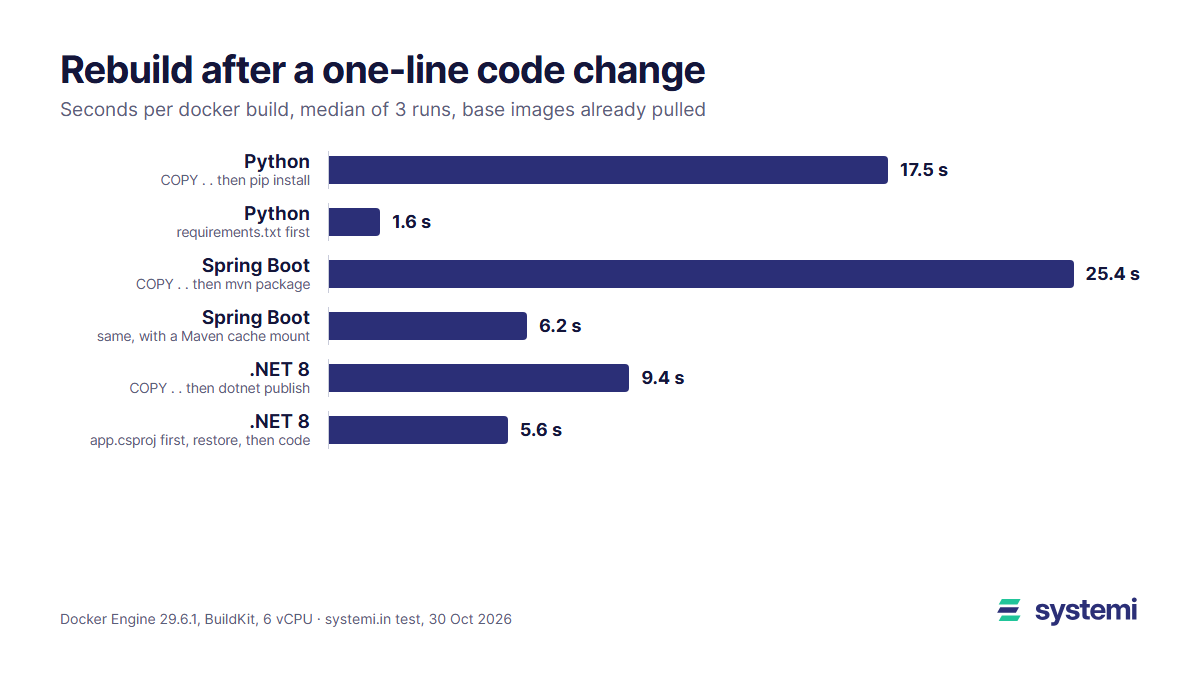
Short version: copying the lock file first and installing before copying the code cut a code-only rebuild from 17.5 s to 1.6 s for Python and from 9.4 s to 5.6 s for .NET. For Spring Boot the Maven cache mount mattered more than the order: 25.4 s down to 6.2 s, and the classic mvn dependency:go-offline step made cold builds 21 s slower because it downloads 267 jars where the build needs 109. A cache mount saved 6 s of Python's 19 s dependency reinstall; switching pip to uv saved another 6.
How we measured
Each app answers GET / with a small JSON object and pulls in the kind of dependencies a real SaaS app starts with. A script copies the app to a fresh folder, empties the build cache with docker builder prune -af (base images stay pulled, so we time the build, not the base image download), then builds four times in a row: cold, again with nothing changed, after editing one string in the code, and after adding one dependency. Every layout ran 3 times; the tables show the median.
The four layouts
Shown for Python; the Java and .NET versions follow the same pattern with pom.xml and app.csproj in place of requirements.txt, and a second stage that copies only the jar or the publish output into the runtime image.
Why the order matters: a COPY step's cache key is a checksum of the files it copies (modification times are ignored), and once a step misses the cache every step after it runs again. With COPY . . near the top, a one-line code change reruns the install. A cache mount is different: it is a folder that BuildKit keeps between builds and mounts only while that RUN step runs. It is not part of the image, and it survives when the layer itself has to be rebuilt, so a rerun install finds its downloads already there. Cache mounts need no # syntax line on current Docker; BuildKit has been the default builder since Docker Engine 23.
Python: lock file first takes a code change from 17.5 s to 1.6 s
| Dockerfile | Cold build | No change | Code-only change | One dependency added |
|---|---|---|---|---|
| COPY . . then pip install | 18.9 s | 1.1 s | 17.5 s | 18.6 s |
| COPY . . + pip cache mount | 19.2 s | 1.0 s | 12.6 s | 13.2 s |
| requirements.txt first | 18.8 s | 1.1 s | 1.6 s | 19.2 s |
| requirements.txt first + cache mount | 19.5 s | 1.2 s | 1.6 s | 12.8 s |
With the lock file first, a code change only reruns the final COPY; nothing is installed. The cache mount helps when the install has to run: 18.6 s down to 12.8 s after a dependency change. That 6 s is the download of 19 MB in 27 wheels; the other 11 to 12 s is pip unpacking and installing them and compiling the .pyc files, which the download cache can't skip. Layout 4 is the clear winner: the fastest or within 0.1 s of it in every case except cold, where all four took about 19 s.
Since the install itself was the slow part, we tried uv in place of pip in layout 4, with its own cache mount and bytecode compilation turned on so it does the same work as pip. Three more runs each:
| Layout 4 with | Cold build | Code-only change | One dependency added |
|---|---|---|---|
| pip install | 19.2 s | 1.9 s | 13.9 s |
| uv pip install --system | 15.0 s | 2.0 s | 7.6 s |
UV_LINK_MODE=copy stops uv warning that it can't hardlink from the cache mount into the image, which sit on different filesystems.
Spring Boot: the Maven cache mount beats the order
| Dockerfile | Cold build | No change | Code-only change | One dependency added |
|---|---|---|---|---|
| COPY . . then mvn package | 29.0 s | 1.3 s | 25.4 s | 29.2 s |
| COPY . . + Maven cache mount | 29.3 s | 1.3 s | 6.2 s | 7.1 s |
| pom.xml first, dependency:go-offline | 50.4 s | 1.3 s | 6.4 s | 49.2 s |
| pom.xml first, go-offline + cache mount | 47.4 s | 1.4 s | 6.3 s | 12.5 s |
The usual Maven advice is layout 3: copy pom.xml, run mvn dependency:go-offline, then copy src. It does make a code change fast (6.4 s, of which about 5 s is Maven starting and compiling), but cold builds and dependency changes took 50 s instead of 29 s. The reason is what go-offline downloads. In an empty local repository, mvn package alone fetched 109 jars (57 MB); dependency:go-offline fetched 267 jars (97 MB), because it resolves every plugin Maven might use, not only the ones this build runs. It is thorough, though: after go-offline the package step downloaded nothing, and mvn -o package (offline) built fine with Maven 3.9.16 and the plugin versions Spring Boot 3.5's parent pins. The old complaint that go-offline misses plugin dependencies (Maven issue MDEP-82) didn't show up in this setup.
A cache mount on /root/.m2 makes the download a one-time cost no matter which step reruns. With it, plain COPY . . was the fastest layout for both changes: 6.2 s for code, 7.1 s for a new dependency, because Maven fetches only the one new jar. With go-offline and the mount, a dependency change still took 12.5 s: a second Maven start and the full plugin resolution, done offline from the mount, every time pom.xml changes.
.NET: project file first saves 4 s, the cache mount little
| Dockerfile | Cold build | No change | Code-only change | One dependency added |
|---|---|---|---|---|
| COPY . . then dotnet publish | 11.3 s | 1.2 s | 9.4 s | 12.4 s |
| COPY . . + NuGet cache mount | 11.5 s | 1.3 s | 7.4 s | 10.9 s |
| app.csproj first, restore, then code | 11.9 s | 1.3 s | 5.6 s | 14.1 s |
| app.csproj first + cache mount | 11.7 s | 1.3 s | 5.8 s | 12.5 s |
Copying app.csproj first and running dotnet restore as its own step cut a code change from 9.4 s to 5.6 s; what remains is the compile and publish. The cache mount on /root/.nuget/packages hardly changed anything here, and the dependency-change runs varied by up to 4.6 s between runs, more than the differences between layouts. The reason is size: our app's packages came to 15 MB in four packages, because ASP.NET Core itself ships in the SDK image and isn't downloaded. An app with dozens of packages has more to gain from the mount; ours didn't.
One trap if you use the mount: the packages live only in the mount, not in a layer. Restoring with the mount and then running dotnet publish --no-restore without it failed with error NETSDK1064: Package Microsoft.Extensions.Logging.Abstractions, version 8.0.0 was not found. Mount the same cache on both steps. The same goes for Maven: the step that compiles has to see the .m2 mount the download step filled.
What it adds up to
A no-change rebuild took 1.0 to 1.4 s in every layout, so the cache works for everyone; the layouts differ on the builds you actually make. Say a small team deploys 10 times a working day, 22 days a month, and almost every deploy is a code-only change:
| Stack | Worst code-only rebuild | Best | Saved per build | Saved per month (220 builds) |
|---|---|---|---|---|
| Python | 17.5 s | 1.6 s | 15.9 s | 58 min |
| Spring Boot | 25.4 s | 6.2 s | 19.2 s | 70 min |
| .NET 8 | 9.4 s | 5.6 s | 3.8 s | 14 min |
An hour a month is not dramatic for one app, but it is an hour of waiting in the middle of deploys, multiplied by every app and every developer who builds locally. Our dependencies were small and our connection fast; a slower link or a bigger dependency tree makes the copy-everything layouts worse, because each rebuild repeats the download.
Cache mounts and CI runners
A cache mount lives in the builder that ran the build. On your laptop or on a server that builds on deploy, that builder stays, so the mount keeps paying off. A fresh CI runner starts with an empty builder: layer cache can be exported and imported (--cache-to / --cache-from), but Docker's documentation says BuildKit doesn't keep cache mounts in the GitHub Actions cache by default. There, the layer from the lock-file-first step is what survives between runs, so put the lock file first even where the mount made the order look unimportant (Spring Boot). Our test ran on one machine with a warm builder, which is the case the mount helps most.
The order that wins
| Stack | Layout to use | Code-only / dependency change in our test |
|---|---|---|
| Python | requirements.txt first, install with a cache mount; uv instead of pip if you can | 1.6 s / 12.8 s with pip, 2.0 s / 7.6 s with uv |
| Spring Boot (Maven) | Cache mount on /root/.m2 on every mvn step; on CI without a kept builder, pom.xml first | 6.2 s / 7.1 s (COPY . . + mount) |
| .NET | app.csproj first, restore as its own step; the same cache mount on restore and publish | 5.6 s / 12.5 s to 14.1 s |
Two more habits keep the cache hitting: a .dockerignore with bin/, obj/, target/ and __pycache__/, so build output from your machine doesn't change the context, and pinned versions in the lock file, so a dependency change is a change you made. Smaller base images speed up the first pull; see our base image test for slim, Alpine, distroless and chiselled, and our cold start test for how long each runtime takes to answer once the image is built.
Sources: our measurements of 30 Oct 2026 (apps, the four Dockerfiles per stack, the build script and the raw timings are kept with the test); Docker docs: Optimize cache usage in builds (layer order, cache mounts for pip and NuGet), Build cache invalidation (COPY checksums, mtime ignored, later steps rerun) and Cache management with GitHub Actions (cache mounts not kept by default); Apache Maven dependency:go-offline and issue MDEP-82; uv Docker integration (cache mount, UV_LINK_MODE, bytecode compilation).
On systemi you deploy a Python, Java, .NET, PHP or static app from its requirements.txt, pom.xml or .csproj, and we build and run the container, with a PostgreSQL database per app and a subdomain.
See how deploys work