
A nightly pg_dump loses up to a day of writes. Point-in-time recovery (PITR) loses at most a minute: you keep a base backup plus every WAL file PostgreSQL writes after it, and on a bad day you replay the WAL up to the second before the mistake. The question for a small app is what that costs: how much WAL one day of traffic makes, how big the archive gets, and how long a restore takes. We measured it on PostgreSQL 18 with a 1 GB app database at 10, 100 and 1,000 writes a minute, with wal_compression off, lz4 and zstd.
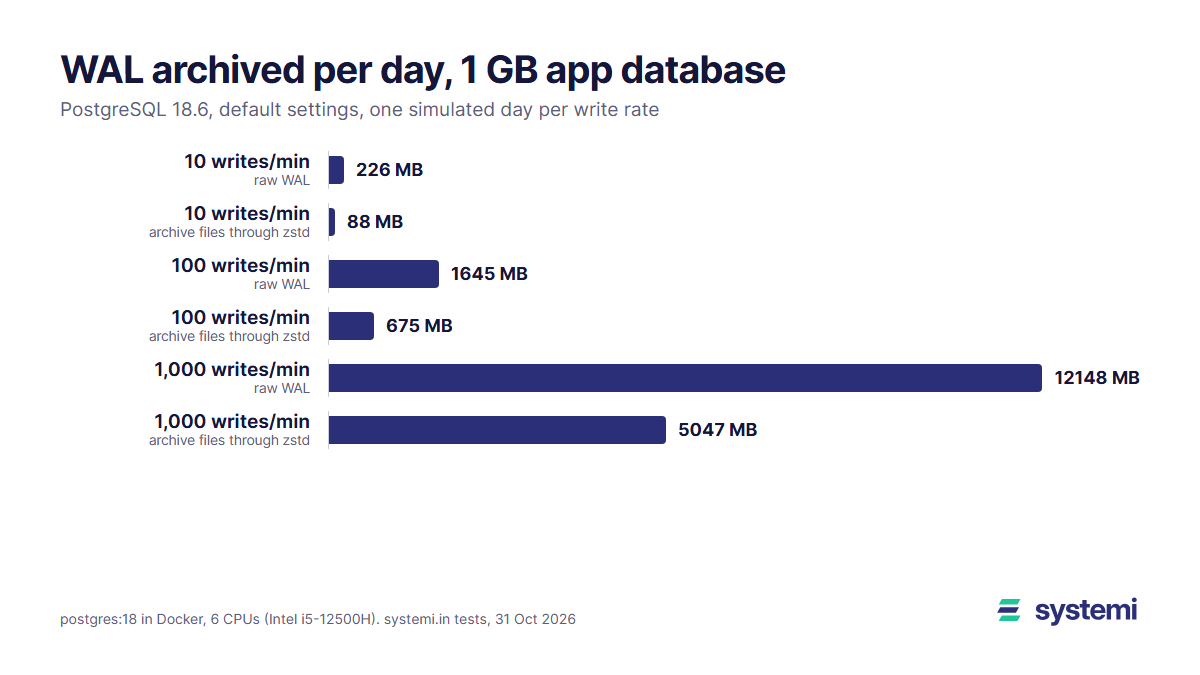
Short version: one day of writes made 226 MB of WAL at 10 writes a minute, 1.64 GB at 100 and 12.1 GB at 1,000, with default settings. About 96% of it is full-page images, copies of whole 8 KB pages written the first time a page changes after each checkpoint, so each write is expensive: 15.7 KB at 10 a minute, 8.4 KB at 1,000. Compressing the archived files with zstd cuts the day to 87.8 MB, 675 MB and 5.05 GB. A compressed base backup of the 1 GB database is 304 MB, and replaying a whole day of WAL took 1.3 s, 5.3 s and 39.9 s. The trap is archive_timeout: at 60 seconds a quiet app archives 1,440 files of 16 MiB a day, 24.2 GB, unless the archive command compresses them.
What point-in-time recovery needs
PostgreSQL writes every change to the write-ahead log (WAL) before it changes the data files, in 16 MiB segment files under pg_wal/. PITR keeps two things: a base backup, a copy of the whole data directory taken with pg_basebackup while the server runs, and the WAL archive, every segment since that backup, copied out by archive_command when a segment is full (or streamed with pg_receivewal). To restore, you unpack the base backup, tell PostgreSQL where the archive is (restore_command) and when to stop (recovery_target_time), and it replays the WAL up to that moment.
A dump is different: pg_dump writes the rows out, and a restore loads them and builds the indexes again. It is one consistent moment per run, and its size depends only on the data. WAL size depends on how many writes you do, and on a setting most people never look at: how often a checkpoint happens.
How we measured
The database is the same synthetic app we used for pg_dump formats and compression: users, orders and events with six indexes, 1,074 MB on disk (384,000 users, 1.15 million orders, 3.84 million events). A "write" is one transaction from a mix that looks like a small app: 60% insert an event (a jsonb row), 30% update one random order's status, 10% insert an order, run with pgbench and three custom scripts.
Waiting a real day per setting would take weeks, so we simulated the day. The WAL a day makes depends on how many writes land between checkpoints, because the first change to each page after a checkpoint writes the whole page. PostgreSQL checkpoints every 5 minutes by default (checkpoint_timeout), 288 times a day. So one simulated day is 288 rounds of 5 minutes' worth of writes (50, 500 or 5,000) followed by CHECKPOINT. archive_timeout was simulated the same way, with pg_switch_wal() after every 1 or 5 minutes' worth of writes.
One setting at 1,000 writes a minute (1.44 million transactions) took 25 minutes to simulate.
WAL per day at 10, 100 and 1,000 writes a minute
| Writes a minute | wal_compression | WAL per day | Per write | Full-page images | Archive, lz4 files | Archive, gzip files | Archive, zstd files |
|---|---|---|---|---|---|---|---|
| 10 | off (default) | 226 MB | 15.7 KB | 97.7% | 130 MB | 94.1 MB | 87.8 MB |
| 10 | lz4 | 145 MB | 10.1 KB | 96.4% | 120 MB | 95.0 MB | 89.3 MB |
| 10 | zstd | 103 MB | 7.1 KB | 94.9% | 101 MB | 99.6 MB | 96.2 MB |
| 100 | off (default) | 1.64 GB | 11.4 KB | 97.1% | 931 MB | 697 MB | 675 MB |
| 100 | lz4 | 1.06 GB | 7.3 KB | 95.5% | 895 MB | 718 MB | 702 MB |
| 100 | zstd | 768 MB | 5.3 KB | 93.7% | 750 MB | 740 MB | 728 MB |
| 1,000 | off (default) | 12.1 GB | 8.4 KB | 95.8% | 6.75 GB | 5.18 GB | 5.05 GB |
| 1,000 | lz4 | 7.61 GB | 5.3 KB | 93.3% | 6.66 GB | 5.37 GB | 5.33 GB |
| 1,000 | zstd | 5.67 GB | 3.9 KB | 91.0% | 5.46 GB | 5.37 GB | 5.34 GB |
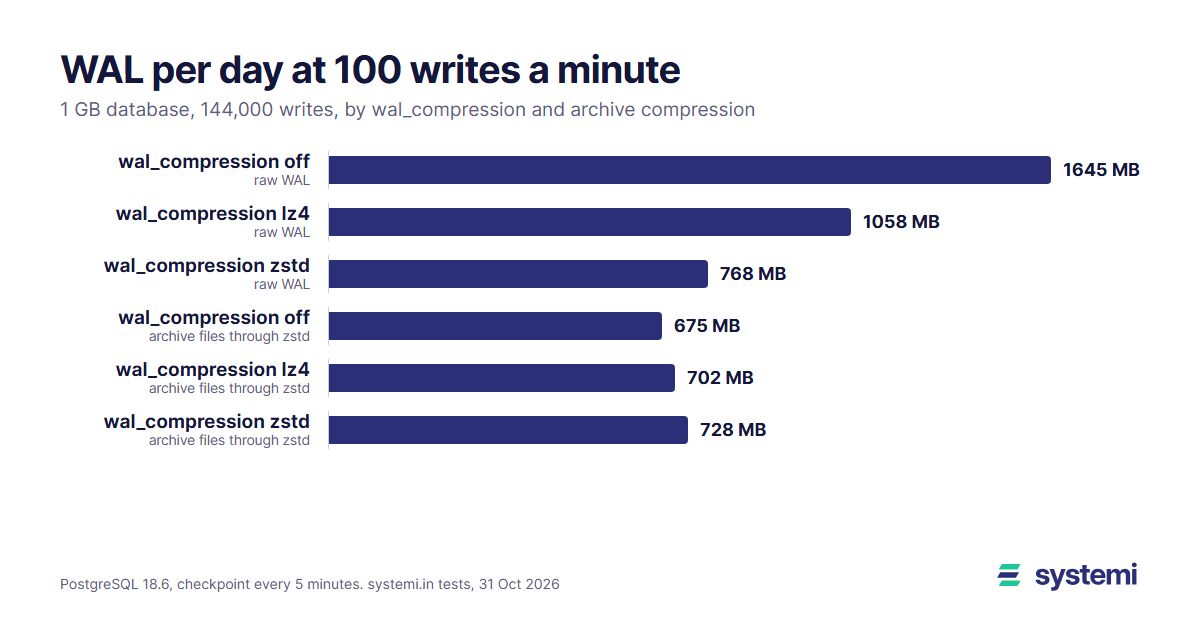
What the table shows:
- WAL is mostly full-page images. 98% of the bytes at 10 writes a minute and 96% at 1,000. The row changes themselves were only 47 MB a day at 100 writes a minute, about 329 bytes per write. Each write touches a table page and two to four index pages, and in a 1 GB database most of them have not changed since the last checkpoint, so each costs a full 8 KB copy.
- Fewer writes cost more per write. 15.7 KB at 10 a minute against 8.4 KB at 1,000: with more writes between checkpoints, more of them land on a page that already has its full-page image in this round.
- wal_compression shrinks the WAL, not the archive. zstd made 53% less WAL and lz4 36% less at 100 writes a minute. But compressing the archived files with zstd gets as far or further from uncompressed WAL (675 MB against 728 MB), because one compressor over a whole 16 MiB file beats compressing each page alone. `wal_compression` still pays where WAL travels uncompressed: fewer bytes written on the server, a smaller `pg_wal/`, less replication traffic, and `pg_receivewal`, which can only compress with gzip or lz4.
- zstd is the archive compressor to use. gzip came within a few percent of it on size but costs about three times the CPU (see the pg_dump article); lz4 files were 30 to 50% bigger.
The archive_timeout trap
archive_command runs only when a 16 MiB segment is full. At 10 writes a minute that takes about 107 minutes, so without a timeout the newest stretch of writes exists only on the database server. archive_timeout forces a new segment after that many seconds, and the PostgreSQL documentation warns that a segment closed early is "still the same length as completely full files":
| Writes a minute | archive_timeout | Files archived per day | Archive, plain copies | Archive, lz4 files | Archive, zstd files |
|---|---|---|---|---|---|
| 10 | 0 (off) | 6 | 103 MB | 101 MB | 96.2 MB |
| 10 | 300 s | 288 | 4.83 GB | 119 MB | 98.2 MB |
| 10 | 60 s | 1,440 | 24.2 GB | 195 MB | 100 MB |
| 100 | 0 (off) | 45 | 768 MB | 750 MB | 728 MB |
| 100 | 300 s | 288 | 4.83 GB | 765 MB | 728 MB |
| 100 | 60 s | 1,440 | 24.2 GB | 843 MB | 735 MB |
With cp as the archive command, a 60-second timeout turns 103 MB of WAL into 24.2 GB a day, 235 times more. The rest of a segment after a forced switch compresses to almost nothing, so with zstd in the archive command the same day is 100 MB instead of 96.2 MB. Compress in the archive command and a one-minute timeout is nearly free; copy plain files and it fills a disk in weeks. (These runs used wal_compression = zstd; the zstd-file sizes barely depend on it.) At 1,000 writes a minute a segment fills every 119 seconds on its own, so the timeout doesn't matter there.
pg_receivewal avoids the question: it streams WAL over a replication connection as it is written, so it needs no timeout and loses at most the last few seconds (none with --synchronous and a synchronous standby setting). It needs a second machine or process that stays connected, and it can compress only with gzip or lz4.
Base backup size and time
| Format | pg_basebackup options (plus -X stream -c fast) | Size | Time |
|---|---|---|---|
| plain directory | -Fp | 1.11 GB | 1.5 s |
| tar | -Ft | 1.11 GB | 1.4 s |
| tar, gzip on the client | -Ft -z | 299 MB | 30.0 s |
| tar, lz4 on the server | -Ft --compress=server-lz4 | 437 MB | 2.4 s |
| tar, zstd on the server | -Ft --compress=server-zstd | 304 MB | 5.1 s |
| tar, zstd on the client | -Ft --compress=client-zstd | 304 MB | 5.9 s |
A base backup copies the data files as they are, indexes included, so it is bigger than a dump: 1.11 GB uncompressed for a 1,074 MB database, 304 MB with zstd, against 185 MB for pg_dump -Fc -Z zstd of the same database. zstd took 5.1 s; gzip, which -z still picks, took 30.0 s for about the same size. server-zstd compresses on the database server and sends less over the network; client-zstd does it on the machine running pg_basebackup. Both made the same file.
Restore time: replaying one day
| Writes a minute | wal_compression | WAL replayed | Replay time (median of 3) | WAL per second |
|---|---|---|---|---|
| 10 | off (default) | 226 MB | 1.3 s | 174 MB/s |
| 10 | lz4 | 145 MB | 1.0 s | 149 MB/s |
| 10 | zstd | 103 MB | 1.4 s | 74 MB/s |
| 100 | off (default) | 1.64 GB | 5.3 s | 310 MB/s |
| 100 | lz4 | 1.06 GB | 4.3 s | 245 MB/s |
| 100 | zstd | 768 MB | 7.2 s | 107 MB/s |
| 1,000 | off (default) | 12.1 GB | 39.9 s | 304 MB/s |
| 1,000 | lz4 | 7.61 GB | 40.4 s | 189 MB/s |
| 1,000 | zstd | 5.67 GB | 53.5 s | 106 MB/s |
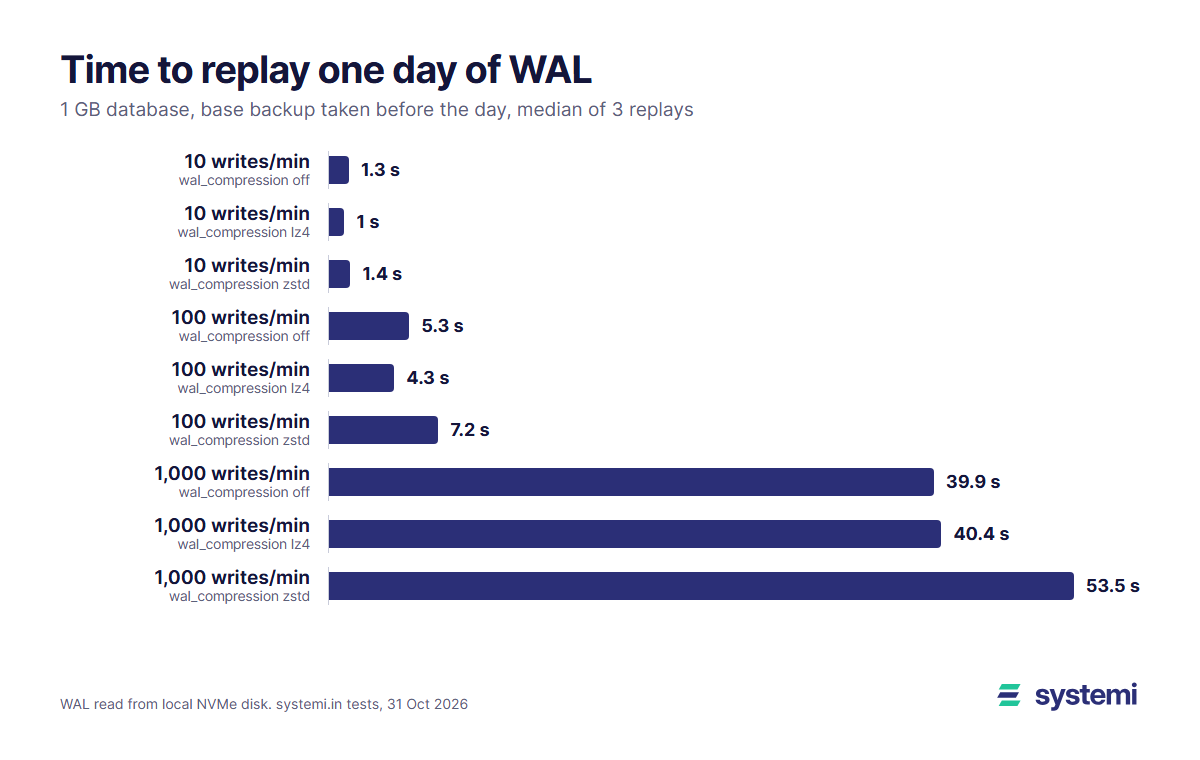
Replay is fast: one day at 1,000 writes a minute, 12.1 GB of WAL, replayed in 39.9 s. Every replay ended with the same row counts as the source. At 1,000 writes a minute off replayed fastest and zstd slowest; at 100 writes a minute lz4 took 4.3 s, off 5.3 s and zstd 7.2 s. lz4 has fewer bytes to read and decompresses almost for free; zstd page images cost more to decompress than their smaller size saves.
Replay time grows with the days since the base backup. With a weekly base backup, a restore on day 7 replays seven days: about 37.2 s at 100 writes a minute and 4.7 minutes at 1,000, plus unpacking the base backup and decompressing each WAL file in restore_command. For comparison, pg_restore of the same 1 GB database from a dump took 14.6 s, most of it rebuilding indexes, which a PITR restore never does.
PITR or a nightly dump: storage and cost
| Writes a minute | WAL per day (zstd files) | 7-day window, weekly base backup | R2 a month | 7-day window, daily base backup | R2 a month |
|---|---|---|---|---|---|
| 10 | 87.8 MB | 1.84 GB | $0.028 | 3.14 GB | $0.047 |
| 100 | 675 MB | 10.1 GB | $0.151 | 7.84 GB | $0.118 |
| 1,000 | 5.05 GB | 71.3 GB | $1.069 | 42.8 GB | $0.642 |
| nightly pg_dump, any rate | – | 1.48 GB (8 dumps) | $0.022 | – | – |
For a 7-day recovery window with a weekly base backup you keep two base backups and up to 14 days of WAL (the older backup is needed until the newer one is a week old); with daily base backups, 8 backups and 8 days of WAL. Base backups are 304 MB each with zstd. Prices at Cloudflare R2's $0.015 per GB-month, as listed on 28 October 2026 (the first 10 GB a month are free). At 10 and 100 writes a minute PITR costs cents a month. At 1,000 writes a minute the weekly scheme keeps 71.3 GB, about $1.07 a month, and daily base backups cut that to 42.8 GB and the worst-case replay to one day. The bigger costs there are 5.05 GB of upload a day and the restore time.
When a daily dump is enough
- A day of lost writes is survivable. Content that can be re-entered, a prototype, an internal tool, data that can be rebuilt from another system. A nightly `pg_dump -Fc -Z zstd` kept off the machine is simple, and for 1 GB it takes 6 s to make and 15 s to restore.
- You want back one database or one table. A dump restores per database, and `pg_restore -t` picks a single table. PITR always restores the whole cluster, every database in it.
- You can't change server settings. On a managed or shared PostgreSQL you usually can't set `archive_command` or open a replication connection, so a dump from your connection string is what you have.
When you need point-in-time recovery
- Writes are money or promises. Orders, payments, bookings, sign-ups: losing the afternoon means refunds and apologies.
- The likely disaster is a mistake, not a dead disk. A `DELETE` without `WHERE` at 14:05 or a bad migration: PITR stops at 14:04:59; a dump takes you back to last night.
- The cost is small anyway. At 10 to 100 writes a minute the archive is 87.8 MB to 675 MB a day compressed.
Many teams do both: PITR for the last week or two, and a weekly or monthly dump kept for a year, because a dump restores into any newer PostgreSQL version and a base backup only into the same major version.
Setting it up
On your own PostgreSQL 18 server. 1. Archive every segment, compressed, and close a segment at least every minute (postgresql.conf; archive_mode needs a restart):
2. Take a base backup every week (or every night at 1,000 writes a minute) from cron, and copy /backup to another machine or object storage:
3. Watch it: select archived_count, failed_count, last_failed_wal from pg_stat_archiver;. A failing archive command makes pg_wal/ grow until the disk is full, so alert on failed_count.
4. To restore to 14:04:59: stop the server, move the old data directory aside, unpack the base backup (base.tar.zst into the empty data directory, the pg_wal.tar file into its pg_wal/), then add the recovery settings and start:
Without recovery_target_action = 'promote' PostgreSQL pauses at the target, read-only, so you can check the data first and then run select pg_wal_replay_resume();. Practise the restore on a scratch machine once a month. Tools such as pgBackRest, WAL-G and Barman wrap these steps with retention, parallel transfer and checks.
Backups on systemi
Every systemi app gets its own PostgreSQL 18 database and role. Server settings such as archive_command and replication connections are not open to an app's role, so for your own copies use pg_dump with the connection string from the console, as in pg_dump formats and compression, measured; each dump holds exactly one app (why one database per app is cheap). If your app takes orders all day, dump more often than nightly: a 1 GB database dumps in about 6 seconds.
Sources: our own tests on 31 October 2026 (one simulated day per setting, 3 replays each; scripts and raw output kept with the article's change request); PostgreSQL 18 documentation: WAL configuration (wal_compression methods pglz/lz4/zstd, default off; full-page images; checkpoint_timeout default 5 min; archive_timeout and early-closed segments being full length; recovery targets), continuous archiving and PITR, pg_basebackup, pg_receivewal (no archive_timeout needed; compression gzip or lz4 only); Cloudflare R2 pricing ($0.015 per GB-month, 10 GB free), as listed on 28 October 2026.
systemi gives every app its own PostgreSQL 18 database, with the connection string for pg_dump ready in the console.
Read the databases guide