
A small app's database is easy to back up: one pg_dump a night and a few copies somewhere else. The choices are the format (plain SQL, custom or directory) and the compression (none, gzip, lz4 or zstd), and they change the file size by 4x and the time by more than 60x. We dumped and restored the same app database at 10 MB, 100 MB and 1 GB on PostgreSQL 18, three times each, with every format and method.
Short version: for a 1 GB database, pg_dump -Fc -Z zstd made a 176.7 MiB file in 6.0 seconds. The default -Fc (gzip) made a file 2% smaller in 18.4 seconds, three times longer. lz4 was as fast as zstd but 60% bigger, and zstd:19 saved another 20% for 398 seconds of CPU. Restore time hardly depends on the compression: 14 to 15 seconds for 1 GB with one job, 11 seconds with -j 4. Keeping 23 copies (a week of dailies, a month of weeklies, a year of monthlies) of that 1 GB app costs about 6 cents a month on object storage.
How we measured
The database is a synthetic app with three tables: users (email, name, plan), orders (status, amount, a note on 40% of rows, foreign key to users) and events (kind, timestamp and a small jsonb payload), with a primary key on each and three more indexes. events has ten rows per user and holds about 80% of the data, which is the usual shape: one log-like table outgrows the rest. Strings repeat the way real data does (plans, statuses, paths, browser names) next to random hex values that don't compress. We scaled it by the number of users:
| Database | Tables | Indexes | Tables + indexes | pg_database_size() | Rows |
|---|---|---|---|---|---|
| 10 MB | 6.86 MiB | 2.89 MiB | 9.75 MiB | 17.5 MiB | 50,400 |
| 100 MB | 67.4 MiB | 28.0 MiB | 95.4 MiB | 103.1 MiB | 504,000 |
| 1 GB | 718.8 MiB | 297.5 MiB | 1,016.3 MiB | 1,024.0 MiB | 5,376,000 |
We label the sizes by tables plus indexes, the space your data takes. pg_database_size() also counts the system catalogs every database carries, 7.4 MiB even when empty (see what an empty PostgreSQL 18 database costs), which is why the 10 MB database reports 17.5 MiB.
Every dump and restore ran on the same machine as the server, so network time is not in these numbers. Over a network the dump takes longer, see below.
Dump size and time for 1 GB
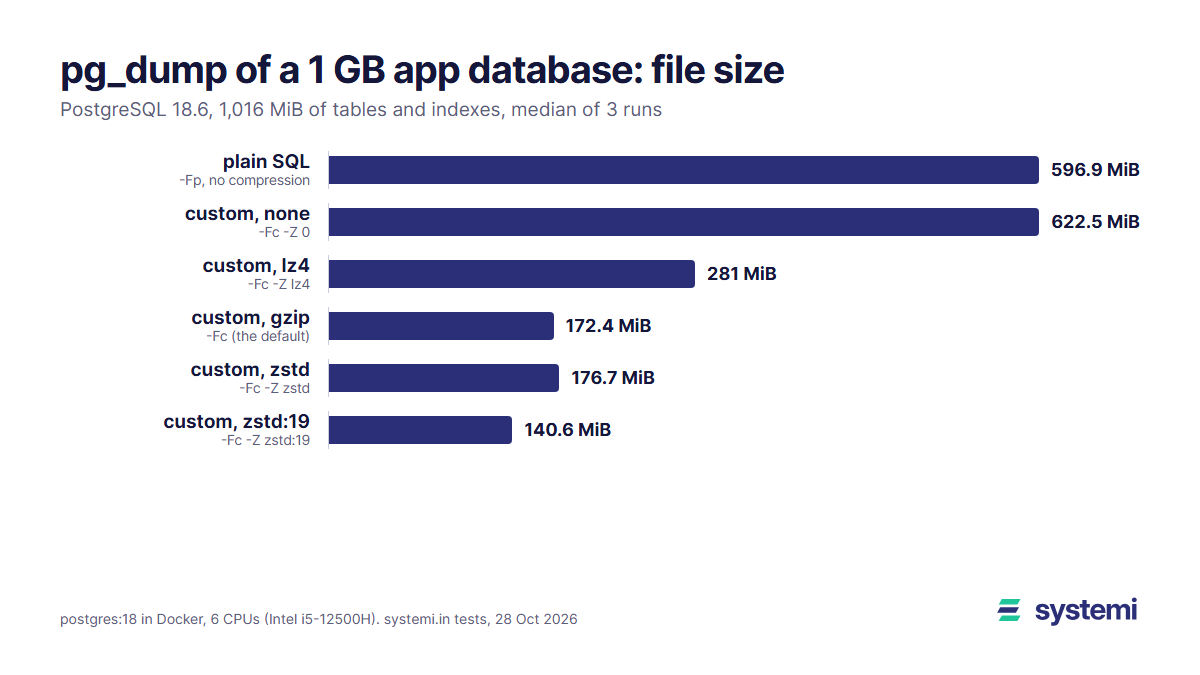
| Format | pg_dump options | File size (MiB) | vs plain | Dump time (s) | pg_dump CPU (s) |
|---|---|---|---|---|---|
| plain SQL | -Fp | 596.9 | 1.00x | 6.1 | 2.4 |
| plain SQL, gzip | -Fp -Z gzip | 172.2 | 3.47x | 17.5 | 17.3 |
| plain SQL, zstd | -Fp -Z zstd | 176.7 | 3.38x | 5.5 | 4.7 |
| custom, none | -Fc -Z 0 | 622.5 | 0.96x | 6.4 | 2.9 |
| custom, lz4 | -Fc -Z lz4 | 281.0 | 2.12x | 6.1 | 3.2 |
| custom, gzip (default) | -Fc | 172.4 | 3.46x | 18.4 | 18.0 |
| custom, gzip:9 | -Fc -Z gzip:9 | 170.4 | 3.50x | 38.3 | 38.3 |
| custom, zstd | -Fc -Z zstd | 176.7 | 3.38x | 6.0 | 5.2 |
| custom, zstd:19 | -Fc -Z zstd:19 | 140.6 | 4.24x | 398.2 | 396.7 |
| directory, zstd, 1 job | -Fd -Z zstd -j 1 | 176.6 | 3.38x | 5.6 | 4.6 |
| directory, zstd, 4 jobs | -Fd -Z zstd -j 4 | 176.6 | 3.38x | 4.6 | 5.2 |
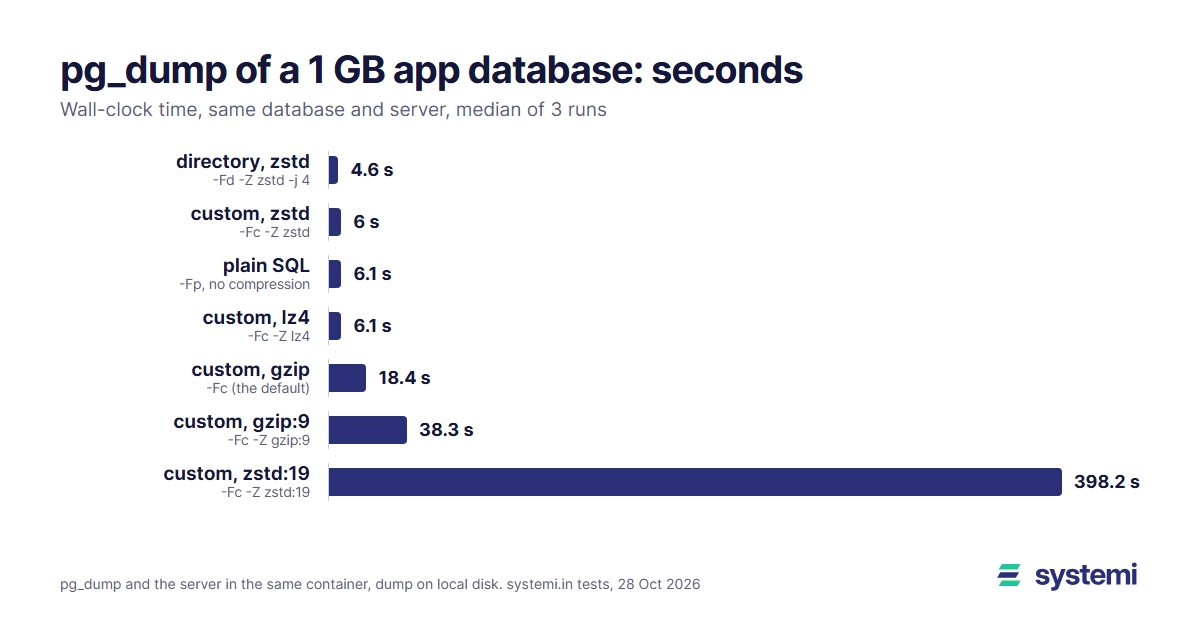
What the table shows:
- A dump is smaller than the database. The plain SQL file is 596.9 MiB for 1,016 MiB of tables and indexes: indexes are not dumped (only their
CREATE INDEXline, rebuilt on restore), and table pages carry row headers and free space that the text form doesn't. - zstd is the best default. At its default level (3) it compressed 3.38x, nearly the 3.46x of gzip, and finished in 6.0 s against 18.4 s. pg_dump spent 5.2 s of CPU on it against 18.0 s for gzip, so on a busy server the gap is real CPU, not just waiting.
- Compression costs nothing in time with zstd or lz4. Both took the same 6.0 to 6.1 s as an uncompressed plain dump: reading rows from the server is the slow part, not compressing them. Only gzip was slower than writing the file raw.
- The extremes don't pay.
gzip:9took twice as long as default gzip for a 1% smaller file.zstd:19made the smallest file, 140.6 MiB, but needed 398 s: 66 times longer for 36 MiB less. - Parallel dump helps little for one big table. pg_dump's
-jworks only with the directory format and dumps one table per job. With 4 jobs the dump took 4.6 s against 5.6 s with one, becauseeventsis 80% of the data and one job still has to dump it alone. - Custom without compression is slightly bigger than plain SQL (622.5 against 596.9 MiB), so there is no reason to pick
-Z 0.
10 MB and 100 MB
Smaller databases scale down almost linearly. At 100 MB:
| Format | pg_dump options | File size (MiB) | vs plain | Dump time (s) | pg_dump CPU (s) |
|---|---|---|---|---|---|
| plain SQL | -Fp | 55.0 | 1.00x | 0.57 | 0.15 |
| plain SQL, gzip | -Fp -Z gzip | 15.8 | 3.47x | 1.7 | 1.8 |
| plain SQL, zstd | -Fp -Z zstd | 16.2 | 3.40x | 0.54 | 0.44 |
| custom, none | -Fc -Z 0 | 57.4 | 0.96x | 0.65 | 0.21 |
| custom, lz4 | -Fc -Z lz4 | 25.9 | 2.13x | 0.61 | 0.29 |
| custom, gzip (default) | -Fc | 15.8 | 3.47x | 1.8 | 1.7 |
| custom, gzip:9 | -Fc -Z gzip:9 | 15.7 | 3.51x | 3.6 | 3.5 |
| custom, zstd | -Fc -Z zstd | 16.2 | 3.40x | 0.57 | 0.43 |
| custom, zstd:19 | -Fc -Z zstd:19 | 13.0 | 4.23x | 37.4 | 37.3 |
| directory, zstd, 1 job | -Fd -Z zstd -j 1 | 16.2 | 3.40x | 0.57 | 0.44 |
| directory, zstd, 4 jobs | -Fd -Z zstd -j 4 | 16.2 | 3.40x | 0.49 | 0.49 |
And at 10 MB, everything but zstd:19 finished in under half a second:
| Format | pg_dump options | File size (MiB) | vs plain | Dump time (s) | pg_dump CPU (s) |
|---|---|---|---|---|---|
| plain SQL | -Fp | 5.41 | 1.00x | 0.13 | 0.06 |
| plain SQL, gzip | -Fp -Z gzip | 1.55 | 3.48x | 0.26 | 0.20 |
| plain SQL, zstd | -Fp -Z zstd | 1.58 | 3.41x | 0.12 | 0.08 |
| custom, none | -Fc -Z 0 | 5.65 | 0.96x | 0.13 | 0.06 |
| custom, lz4 | -Fc -Z lz4 | 2.55 | 2.12x | 0.12 | 0.06 |
| custom, gzip (default) | -Fc | 1.56 | 3.47x | 0.24 | 0.20 |
| custom, gzip:9 | -Fc -Z gzip:9 | 1.54 | 3.51x | 0.42 | 0.36 |
| custom, zstd | -Fc -Z zstd | 1.58 | 3.42x | 0.11 | 0.07 |
| custom, zstd:19 | -Fc -Z zstd:19 | 1.31 | 4.11x | 2.7 | 2.6 |
| directory, zstd, 1 job | -Fd -Z zstd -j 1 | 1.58 | 3.42x | 0.12 | 0.08 |
| directory, zstd, 4 jobs | -Fd -Z zstd -j 4 | 1.58 | 3.42x | 0.12 | 0.09 |
At these sizes the format choice is about convenience, not time. The compression ratio stayed the same from 10 MB to 1 GB (3.4x for zstd and gzip, 2.1x for lz4), so a dump of your own data will scale the same way: measure one, multiply.
Restore time: the format barely matters
| Dump | Restored with | 10 MB (s) | 100 MB (s) | 1 GB (s) |
|---|---|---|---|---|
| plain SQL | psql -f | 0.19 | 1.4 | 16.8 |
| plain SQL, gzip | gzip -dc | psql | 0.17 | 1.4 | 14.7 |
| custom, none | pg_restore | 0.17 | 1.3 | 14.6 |
| custom, lz4 | pg_restore | 0.17 | 1.2 | 14.1 |
| custom, gzip | pg_restore | 0.18 | 1.2 | 14.5 |
| custom, zstd | pg_restore | 0.18 | 1.3 | 14.8 |
| custom, zstd | pg_restore --single-transaction | 0.16 | 1.2 | 14.5 |
| custom, zstd | pg_restore -j 4 | 0.14 | 1.0 | 11.6 |
| directory, zstd | pg_restore -j 4 | 0.14 | 0.94 | 11.0 |
A restore spends its time loading rows with COPY and rebuilding indexes, and the server does that work, not the decompression. For 1 GB, every single-job restore from a custom dump took 14.1 to 14.8 seconds whatever the compression; pg_restore itself used 0.6 to 2.7 s of CPU. The plain SQL file through psql was the slowest, 16.8 s. --single-transaction, which makes the restore all-or-nothing, cost nothing (14.5 s).
Parallel restore (pg_restore -j 4) cut 1 GB to 11.6 s from a custom file and 11.0 s from a directory: it loads the three tables and builds the indexes at the same time, but events and its indexes still dominate. It needs a custom or directory dump (not plain SQL, not a pipe) and can't be combined with --single-transaction. On a database with many similar-sized tables the gain is bigger; with one big table, as most small apps have, expect about a quarter off.
Over the network
If your database is hosted, you run pg_dump with its connection string from your own machine or a CI job. Two things change. First, pg_dump compresses on the client: the server sends rows uncompressed (PostgreSQL 18 has no protocol compression), so a 1 GB database sends about 600 MB over the wire however small the file ends up. At 100 Mbit/s that is at least 50 seconds; it, not the compression, sets the dump time. Second, pg_dump must be at least as new as the server: pg_dump 16 refuses to dump a PostgreSQL 18 server. Install the version 18 client (postgresql-client-18 on Debian and Ubuntu from the PostgreSQL apt repository) and check pg_dump --version.
What to keep and how often
For a small app, a nightly dump with a simple rotation covers the usual accidents: a bad migration found the next morning, a deleted customer found a week later, a question about last quarter's data. Seven daily, four weekly and twelve monthly copies are 23 files. This script does it with nothing but pg_dump and find, from cron at night:
Then copy the folder off the machine (rclone sync /backups/app remote:app-backups to any S3-compatible bucket), because a backup on the same disk as the database is not a backup. And once a month restore the newest dump into a scratch database: createdb app_check && pg_restore -j 4 -d app_check app-2026-10-28.dump, then count rows in your main tables. By the table above, that takes 11 seconds per GB, and it is the only test that proves the file is good.
What it costs to store
The worked example: 23 copies at the sizes we measured, priced at Cloudflare R2 ($0.015 per GB-month, 10 GB free) and Backblaze B2 ($6.95 per TB-month, first 10 GB free), before the free allowances:
| What you keep (23 copies) | One dump | Stored | Cloudflare R2 ($0.015/GB) | Backblaze B2 ($6.95/TB) |
|---|---|---|---|---|
| 1 GB app, plain SQL | 625.9 MB | 14.40 GB | $0.216 | $0.100 |
| 1 GB app, custom gzip (default) | 180.8 MB | 4.16 GB | $0.062 | $0.029 |
| 1 GB app, custom zstd | 185.3 MB | 4.26 GB | $0.064 | $0.030 |
| 1 GB app, custom zstd:19 | 147.5 MB | 3.39 GB | $0.051 | $0.024 |
| 100 apps of 100 MB, custom zstd | 16.9 MB | 38.98 GB | $0.585 | $0.271 |
For one 1 GB app the format decides between 22 and 6 cents a month on R2, and the zstd copies fit in the free 10 GB. The difference matters at scale and in transfer time more than on the bill: 100 apps of 100 MB, dumped with zstd, keep 39 GB, about 59 cents a month on R2 or 27 cents on B2, and Contabo's object storage sells 250 GB with free traffic for €2.49 a month, room for six such fleets. zstd:19 would save 0.9 GB per 1 GB app, 1.3 cents a month on R2, for six and a half minutes of CPU every night: not worth it.
Checklist
- Dump with
pg_dump -Fc -Z zstd: as fast as no compression, under a third of the size, and pg_restore can pick single tables out of it. - Use the directory format with
-jonly when your data is spread over several big tables. - Use a pg_dump client at least as new as the server (18 for PostgreSQL 18).
- Write to a temporary name, check it with
pg_restore --list, then rename, so a failed night never replaces a good file. - Keep 7 daily, 4 weekly and 12 monthly copies, and copy them off the database machine.
- Restore the newest dump into a scratch database once a month and count rows. Use
pg_restore -j 4when you need it fast. - Expect a restore to take about 11 to 15 seconds per GB on a small server, most of it loading rows and rebuilding indexes.
Backing up a database on systemi
Every systemi app gets its own PostgreSQL 18 database and a connection string in the console, so the commands above work as they are: point pg_dump at your app's connection string from your laptop or a scheduled job. One database per app also means each dump holds exactly one app (why one database per app is cheap), and a restore never touches another app's data.
Sources: our own tests on 28 October 2026 (3 runs, scripts and raw output kept with the article's change request); PostgreSQL 18 documentation, pg_dump (-Z methods gzip/lz4/zstd, custom and directory formats compressed with gzip by default, -j only with the directory format, no dumping from newer servers) and pg_restore (-j only with custom and directory archives from a regular file, not with --single-transaction); prices as listed on 28 October 2026: Cloudflare R2 pricing ($0.015 per GB-month standard, 10 GB-month free), Backblaze B2 pricing ($6.95 per TB-month, first 10 GB free), Contabo Object Storage (from €2.49 a month, 250 GB per slice per Contabo's launch post, free traffic).
systemi gives every app its own PostgreSQL 18 database, with the connection string for pg_dump ready in the console.
Read the databases guide