
Rolling back a git-deployed app sounds like one operation, but there are several ways to do it and they rely on different things still existing. We took one small Python app, serving v2, and put it back on v1 by six paths: running the image we kept, rebuilding the old commit, and uploading the old zip, each with and without a build cache. Then we repeated all of them after deleting v1's pinned dependency from the package index. That's 60 timed runs, five per cell.
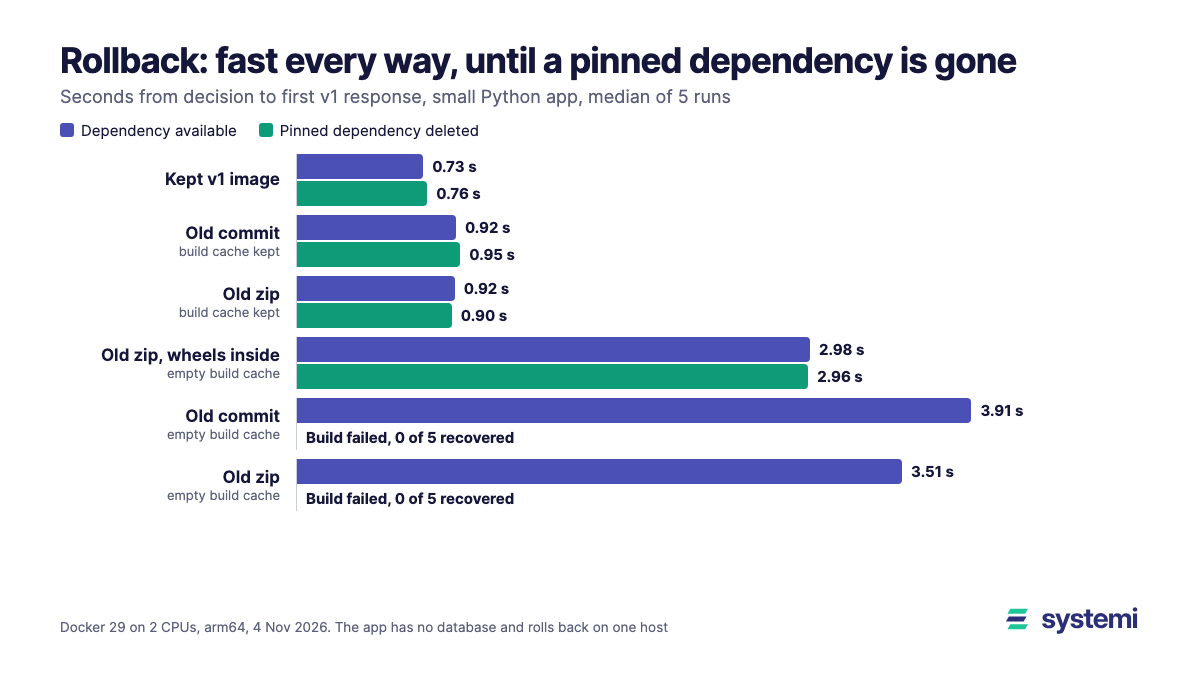
Short version: while everything still exists, speed barely separates them. The kept image took 0.73 s and the slowest rebuild 3.91 s, on an app this small. What separates them is what they depend on. With one pinned dependency gone, the old commit and the old zip failed from an empty cache in all 10 runs, while the kept image, a held cache and a zip carrying its own wheels recovered in all 20.
How we tested
The app is Flask 3.1.3 and gunicorn 26.2.0 on Python 3.14.10, with a multi-stage Dockerfile, every dependency pinned, nine wheels, and GET / naming the version. v1 pins version 1.0.0 of a small package and v2 pins 1.1.0. That package sits on an index we run inside the test, and the rest come from PyPI. So a rollback changes both code and one dependency.
| Path | What happens |
|---|---|
| Kept v1 image | Run the immutable v1 image, built back when v1 was current |
| Old commit | git clone, check out the v1 commit, docker build |
| Old zip | Upload the zip saved at v1, unpack it, docker build |
| Old zip with wheels inside | The same, with vendor/*.whl in the zip and pip --no-index |
The clock starts with v2 answering and stops at the first complete HTTP response that says v1. Exit codes count for nothing here. A prober outside Docker polls GET / on a new connection every 20 ms with a 1 s timeout. The swap is stop then start on the same port. An empty cache means docker builder prune -af before the run, and pip ran in all 30 of those runs. Cache kept means we pruned, then built both versions so the layers were held, and pip ran in none of those 20. The v1 image stayed in place in all 60 runs.
It ran on a Mac mini (Apple M4) through a Docker Desktop VM limited to 2 CPUs and 2.84 GiB, Docker 29.9 on arm64, in a separate daemon, with path order rotated each round.
With the dependency still available
| Path | Recovered | Total | Of which build | No answer |
|---|---|---|---|---|
| Kept v1 image | 5 of 5 | 0.73 s (0.70-0.78) | - | 0.72 s (0.69-0.77) |
| Old commit, cache kept | 5 of 5 | 0.92 s (0.91-1.00) | 0.15 s (0.14-0.16) | 0.77 s (0.68-0.83) |
| Old zip, cache kept | 5 of 5 | 0.92 s (0.88-0.96) | 0.15 s (0.15-0.17) | 0.75 s (0.75-0.85) |
| Old zip with wheels inside, empty cache | 5 of 5 | 2.98 s (2.92-3.08) | 2.19 s (2.18-2.23) | 0.80 s (0.74-0.89) |
| Old commit, empty cache | 5 of 5 | 3.91 s (3.59-8.74) | 3.13 s (2.73-7.90) | 0.80 s (0.72-0.87) |
| Old zip, empty cache | 5 of 5 | 3.51 s (3.44-4.69) | 2.72 s (2.69-3.88) | 0.78 s (0.70-1.68) |
No answer is the time from the last v2 response to the first v1 response, and it's about the same on every path: medians of 0.72 to 0.80 s, which is the stop plus gunicorn starting. The paths differ in how long v2 stays live before the swap: about 0.15 s with a held cache and about 3 s from an empty one. So on a one-host swap like this one, a slower rollback here means the bad version serves longer, not a longer outage.
Keep the resolution in mind. A failed probe takes about 0.17 s, so no-answer times are good to about that much, and the 0.19 s between the kept image and a cached rebuild is close to that limit. The steadier number is the cached build step at 0.15 s. The 8.74 s at the top of the old-commit range was network: that run spent its extra time on PyPI downloads.
With the pinned dependency deleted
Here we removed version 1.0.0 from the index, both file and listing, before the clock started, and left 1.1.0 there. In cache-kept runs the deletion came after the seed builds.
| Path | Recovered | Total |
|---|---|---|
| Kept v1 image | 5 of 5 | 0.76 s (0.73-0.82) |
| Old commit, cache kept | 5 of 5 | 0.95 s (0.92-0.96) |
| Old zip, cache kept | 5 of 5 | 0.90 s (0.84-1.78) |
| Old zip with wheels inside, empty cache | 5 of 5 | 2.96 s (2.95-3.04) |
| Old commit, empty cache | 0 of 5 | Build fails at 2.00 s (1.95-2.33) |
| Old zip, empty cache | 0 of 5 | Build fails at 2.03 s (1.95-2.69) |
All 10 failed builds stopped at the same place:
Pinning didn't help, because the pin names something that no longer exists. Your lock file can be perfect and the old commit still can't be built. The failure itself was tidy: in all 10 runs v2 answered every probe throughout. So the service stays up, but on the version you were trying to leave, and it keeps serving while you look for another way back.
The held cache did recover, 10 of 10, but don't count on it as a rollback plan. Docker's build garbage collection clears the cache when it gets too big or too old, and a fresh host or CI runner has none at all.
A caveat on how often this happens. We simulated a deletion, on one package and one version. This shows what a missing pin does, not how often pins go missing. It's also not what yanking does: under PEP 592 a yanked release still installs for anyone pinned to that exact version. A deleted release, or a private index you've since moved away from, is closer to what we tested. We tried only a deleted release.
A rebuild isn't the same image
In all 20 empty-cache rebuilds that succeeded, the result had a different image ID from the kept v1 image, even with every dependency pinned. We didn't diff the contents, so this says the image is new, not that it behaves differently. It does mean that after a rebuild you are running something you never tested as a whole, at the moment you are trying to get back to something known. A digest identifies the exact content of an image, and a tag can be moved.
The zip with its wheels inside
This path is the cheap middle ground if you have no registry. The zip grew from 944 bytes to 874 KB, and it recovered in 2.98 s with the dependency available and 2.96 s without it, because it never asks an index for anything. The base image still has to be available, as it was here. And wheels can be platform-specific: one of ours is a manylinux aarch64 build, so a zip made this way on arm64 won't install on an x86 host.
What would change on a bigger app
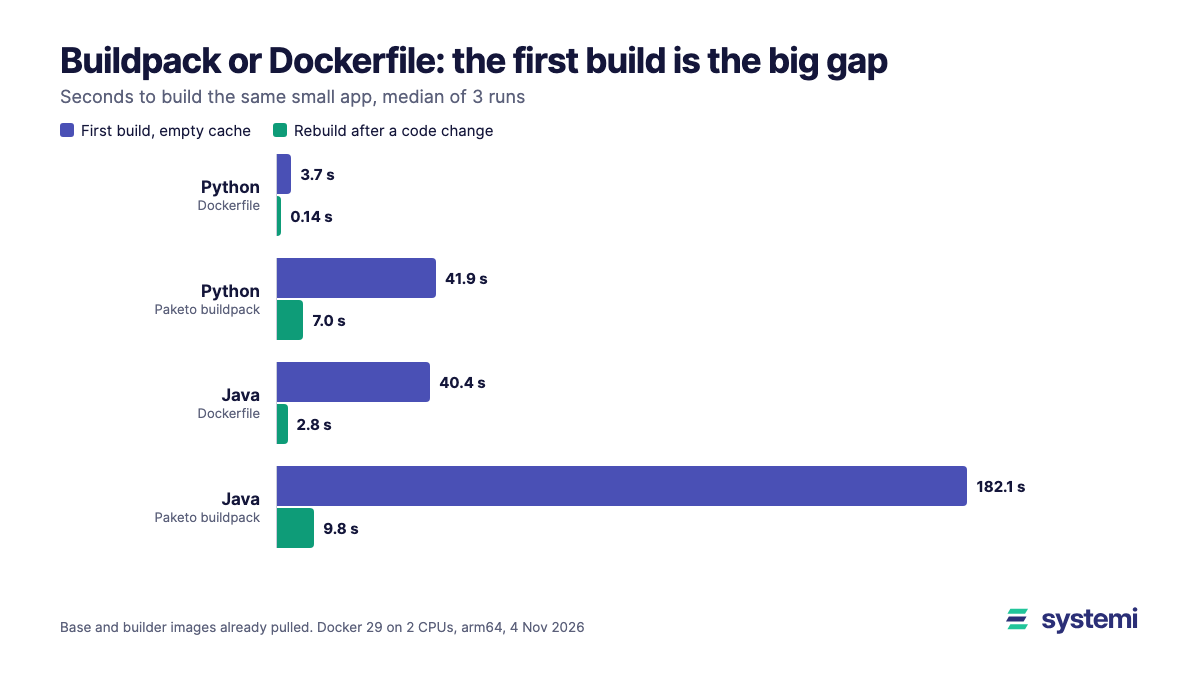
The 3 s rebuilds are a floor, because they come from one source file and nine wheels. Rebuild time scales with the build. We didn't time rollback on a larger app, but a first build of our small Spring Boot app in a separate test took 40 s with a Dockerfile and 182 s with a buildpack, on the same VM. If your rollback lands on an empty cache, expect v2 to stay live for at least about that long. A kept image doesn't grow in the same way, because it skips the build, though pulling it to another host adds time we didn't count here.
How we read it
This part is our opinion. Decide your rollback before you need it, and check that it doesn't depend on anything outside your control:
- If you build images, keep the last few under immutable tags or digests, and roll back by running one. It needs no index, no cache and no build at all.
- If you deploy from a zip, keep the zip of each release, with its wheels if you can't guarantee the index.
- If you deploy from git, a commit alone isn't a release. Put your dependencies somewhere you control, such as a private mirror or a vendored folder.
- Test it once: on a clean machine, rebuild last month's commit. That's the check we'd run first.
What this test doesn't show
The app has no data, and a real rollback also has database state, config and traffic. None of those are here, and a migration that v1 can't read will beat any of these paths. Clone and upload ran over loopback (0.08 s and 0.03 s), so they include no network or real repository size. The kept image was already on the host. Failure time depends on where the missing pin sits: it was third of nine here and pip stopped there, so 2 s isn't general. A platform that starts the old version beside the new one and switches a proxy will have a different no-answer time. Two runs hit the 1 s probe timeout, read 1.68 and 1.67 s no answer, and set the top of two ranges, so v1 may have answered up to about 1 s sooner in those. It's one machine, one network, arm64 and five runs per cell, with other work running.
Related: What a redeploy costs your users covers failed requests during the swap itself, Zip, git URL or container image covers forward deploys, and Rebuild time when only your code changes covers what the build cache buys you.
Sources (read 4 Nov 2026): PEP 592, yanked releases, Docker build garbage collection and Docker image digests. All timings are our own, from the setup above.
On systemi a rollback is a new deploy: upload the zip you kept, or deploy a branch that points at the old commit. The live version keeps serving while that builds, and it stays live if the deploy fails.
See how redeploys work