
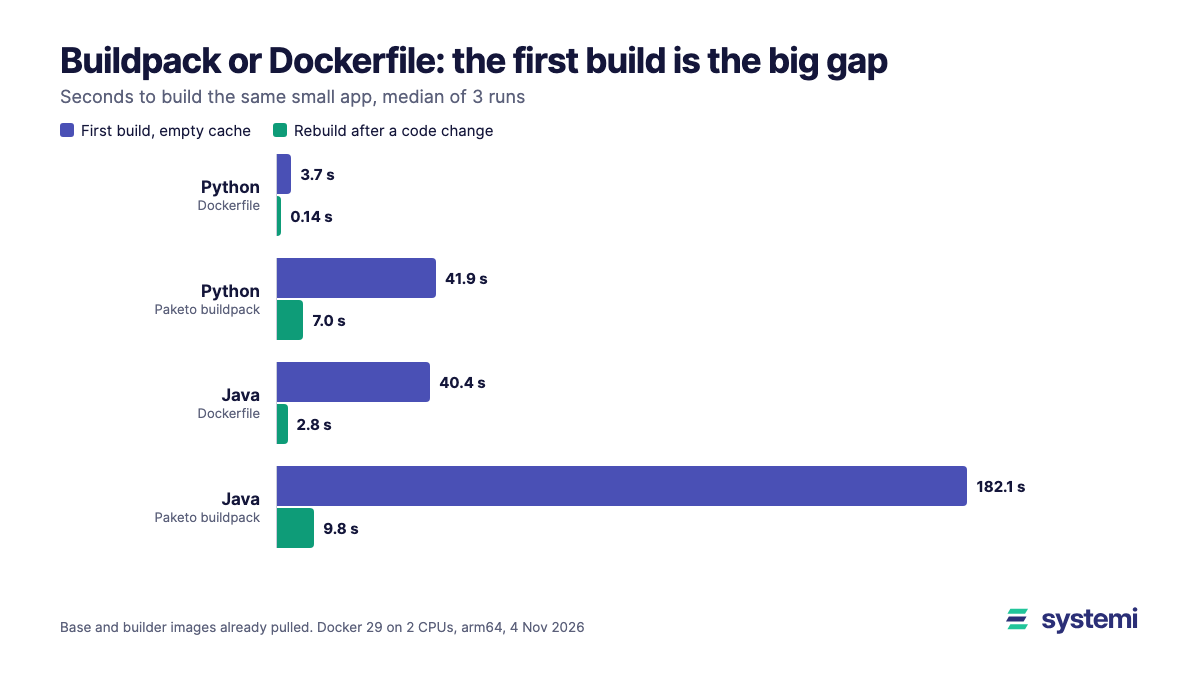
A git-push platform has to turn your source into an image somehow. Usually that means a Dockerfile you wrote or a buildpack that works out the build for you. We built the same two small apps both ways, three rounds per cell, and timed the first build and a rebuild after changing one string in the source.
Short version: the buildpack was slower every time, and the gap was biggest on the first build: 41.90 s against 3.73 s on Python and 182.09 s against 40.41 s on Java. Rebuilds took about 7 s longer on both. Image size went either way: the Python buildpack image was 2.7 times the Dockerfile one, while the Java images were within 1%. The one clear buildpack win was the Java rebuild, which changed 2 KB of image where our plain Dockerfile changed 19 MB.
What we built
| App | Dockerfile path | Buildpack path |
|---|---|---|
| Python: Flask 3.1.3, gunicorn 26.2.0, Python 3.14.10, all dependencies pinned, one source file | Multi-stage build on python:3.14-slim | Paketo Python buildpack, CPython 3.14.10, plus a Procfile |
| Java: Spring Boot 3.5.16 web, Java 21.0.13, Maven 3.10.0, one source file | Multi-stage Maven build on Temurin, then a Temurin 21 JRE with the jar | Paketo Java buildpack on BellSoft Liberica 21.0.13 |
The buildpack path used pack 0.40.9 with paketobuildpacks/ubuntu-noble-builder:0.0.213. A first build means an empty build cache and no earlier app image, with the base and builder images already on the machine, because we timed their pulls separately. Dependencies, the JDK and CPython still came from the internet. A rebuild means the same image tag with one string changed in the source. A run only counted if the image then answered GET / with the expected version, and all 24 did.
It ran on a Mac mini (Apple M4) through a Docker Desktop VM limited to 2 CPUs and 2.84 GiB, Docker 29.9 on arm64. Other work was running on the machine, so the method order rotated each round.
Build times
| App and path | First build, median (range) | Rebuild, median (range) |
|---|---|---|
| Python, Dockerfile | 3.73 s (3.48-6.97) | 0.14 s (0.14-0.18) |
| Python, buildpack | 41.90 s (39.92-41.91) | 6.96 s (6.87-7.25) |
| Java, Dockerfile | 40.41 s (39.92-41.25) | 2.77 s (2.70-2.78) |
| Java, buildpack | 182.09 s (169.50-190.00) | 9.84 s (9.70-10.04) |
The logs show where the first-build gap comes from, and it's mostly downloads. Installing CPython took 26.8 to 30.4 s of the Python buildpack's roughly 40 s; the pip install itself took about a second. The Dockerfile path skips that because Python is already in its base image. On Java, downloading the JDK, the JRE, Maven and syft (the buildpack's bill-of-materials tool) took 135 to 148 s of each build's 170 to 190 s. So on a faster link or with a shared dependency mirror, this gap would shrink.
The rebuild gap is a different thing: it's fixed overhead, and a faster link wouldn't remove it. In one Python rebuild the buildpack's build phase took 1.3 s and its export 3.7 s; in one Java rebuild the build phase took 3.9 s and the export 3.0 s. The rest went on detecting and restoring. A Dockerfile rebuild just reuses its cached layers: 0.14 s when only app.py changes on Python, and 2.77 s on Java, where Maven has to package the jar again.
First pulls
Those tables start with the images already present, which flatters the buildpack more than the Dockerfile. We also pulled everything into an empty daemon, three rounds each:
| What was pulled | Median (range) | Plus first build |
|---|---|---|
| Python base image | 18.3 s (17.6-23.6) | 22 s |
| Java base images (Maven and JRE) | 100.9 s (98.7-110.0) | 141 s |
| Builder and run image, for either app | 351.4 s (343.6-401.9) | Python 393 s, Java 533 s |
The last column adds the two medians. The pull happens once per machine, or once per CI runner that starts with nothing on it. That last case is where a builder of this size hurts: if your runner starts empty every time, you pay close to six minutes on our link before the build begins, unless the images are cached.
Image size and what a rebuild ships
| App and path | Image, gzip | Image, uncompressed | Changed by a rebuild, gzip |
|---|---|---|---|
| Python, Dockerfile | 49.9 MB | 169 MB | 0.25 KB |
| Python, buildpack | 133.7 MB | 485 MB | 0.44 KB |
| Java, Dockerfile | 128.3 MB | 376 MB | 19,036 KB |
| Java, buildpack | 129.0 MB | 377 MB | 2.07 KB |
We measured size by saving each image's layers and compressing them all the same way (gzip level 6), so the two paths compare fairly. Changed bytes are the layers of the rebuilt image whose content hash wasn't in the first image.
The Java row is the interesting one. Our Dockerfile copies the whole Spring Boot jar in one layer, so a one-line change ships the lot: 19 MB, or about 1.5 s at 100 Mbit/s, on every push. The buildpack splits the jar into layers and ships 2 KB. You don't need a buildpack for that. Spring Boot documents how to layer the jar in a Dockerfile, which should narrow the gap, but we didn't test that version.
What 100 deploys cost in build time
One first build and 99 rebuilds, from the medians above, without the pulls:
| App | Dockerfile | Buildpack | Difference |
|---|---|---|---|
| Python | 0.3 min | 12.2 min | 11.9 min |
| Java | 5.2 min | 19.3 min | 14.0 min |
For a person waiting on one deploy, 7 s doesn't matter. At this scale neither does the total, unless you pay per build minute or builds queue behind each other. Real test suites and compile steps run under either path, and they would add roughly the same time to both columns.
Start time and idle memory
| App and path | Start to first 200 | Idle memory |
|---|---|---|
| Python, Dockerfile | 0.39 s | 47 MiB |
| Python, buildpack | 0.64 s | 51 MiB |
| Java, Dockerfile | 1.09 s | 152 MiB |
| Java, buildpack | 1.06 s | 128 MiB |
Medians over the six runs of each path, and a rough check rather than a benchmark. The Java gap in memory isn't only down to the build method: the two images run different JVM builds (Temurin and Liberica) and we set no memory flags on either, and we didn't look at what the buildpack sets at launch. Don't size a server from it.
Two traps we hit
pack and Docker's containerd image store: on this machine's Docker Desktop, which uses that store, pack build exited 1 with failed to fetch base layers, even for a local export. Its warning points at pack issue 2272, which describes slow builds rather than our failure. So both paths in this test ran in one separate Docker daemon using the classic image store.
A new tag per version makes every buildpack rebuild cold: pack finds its cache volumes and previous image by the full image reference. With app:v1 then app:v2 a Python rebuild took 42.89 s rather than about 7 s. Our runs kept one tag per app. If your pipeline tags images by commit, build to a stable name and add the commit tag afterwards, or give pack a cache image. We didn't test either alternative.
How we read it
This part is our opinion, not a measurement. If you can write a short Dockerfile and keep it up to date, these small apps give no time or size reason to use a buildpack, apart from layering the Java jar, which you can also do yourself. A buildpack earns its overhead when many apps should build the same way without each team owning a Dockerfile, or when you want its rebase to swap a base image without rebuilding. We didn't test rebase. Seven extra seconds per deploy is a fair price for that if you need it, and a poor one if you don't.
What this test doesn't show
These are small apps on purpose. Larger dependency graphs and real test suites change the absolute times, and a compile-heavy build would make 7 s of overhead a smaller share. It's one machine, one network, arm64 and three runs per cell, with other work running, and any time that includes downloads depends on the link. Images went to the local daemon, not to a registry, so push time isn't counted. We tested one builder and one hand-written Dockerfile for each app, and a different choice of either changes the numbers. We didn't measure runtime performance beyond first response and idle memory, or compare what's installed in the images.
Related: Rebuild time when only your code changes covers Dockerfile layouts, Slim, Alpine, distroless or chiselled? covers base images, and Zip, git URL or container image covers the rest of the path from code to live.
Sources (read 4 Nov 2026): Cloud Native Buildpacks documentation, Paketo documentation, Spring Boot's efficient container images page and pack issue 2272. All timings and sizes are our own, from the setup above.
On systemi you send a zip or an https git URL and a branch. We read the top of your project to pick the runtime, then build and start it, so a Python or Java app doesn't need a Dockerfile from you.
See how deploys work